Plan. Book. Done. — for planners & vendors
eventflow.app is an all-in-one platform for events and bookings. Choose your path below.
What’s a planner?
Someone creating and running events—inviting guests, selling tickets, managing schedules, budget, and photos in one place.
What’s a vendor?
A business offering bookable services—publishing availability, accepting/declining bookings, and getting paid. Premium vendors can also sell event tickets with a reduced 3% eventflow.app fee (standard is 4%).
Early access perks for founding planners & vendors—limited availability Claim yours
Four simple steps
From idea to booked to done—without app-switching.
1) Create your space
Spin up an event or vendor profile on eventflow.app. Add dates, media, brand colors, ticketing, or services. Built for speed—no spreadsheet gymnastics.
2) Add & discover vendors
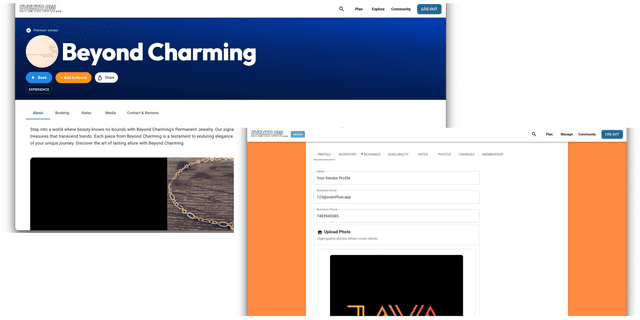
Attach venues and vendors to your event, or list your services as a vendor. Search by city, category, or tags and keep everything visual and on-brand.
3) Bookings and tickets that make sense
Anyone can send requests to vendors. Planners manage live availability of tickets.
4) Run the day effortlessly
Check-ins, schedules, messages, photos, payouts—one dashboard. Premium vendors can even trigger “I’m running late” with ETA to keep planners calm.
Tools that cut the chaos
Plan smarter. Sell faster. Keep everything in one clean flow.
Live Availability
Vendors publish schedules; planners request conflict-free time slots.
Frictionless Booking
Instant (auto-accept) or review-then-accept with decline reasons.
Guest Tools
RSVPs, check-in, messages, and media—without hopping 6 different apps.
Beautiful Vendor Pages
Photos, services, rates, and instant booking. Vendors get found fast.
Tickets & Payments
Stripe checkout, fee control, and optional installments (10% platform fee).
Privacy & Control
Public, private, or password-protected event pages and guest experiences.
Welcome Messages
Send tailored welcomes—vendors for bookings, planners for events.
Event Search
Find public events by city, type, or keyword—fast.
Plan and run your event in one place
Create on eventflow.app
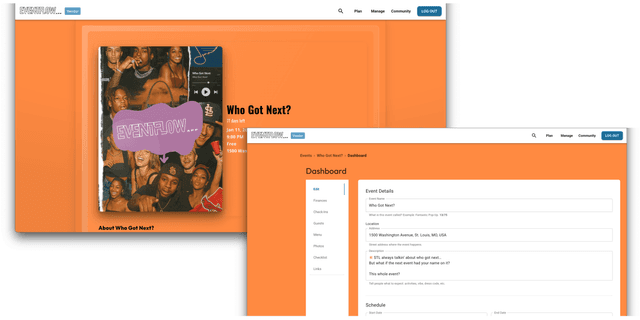
Launch your event, invite guests, set schedules, track budgets, and manage photos—all on one website. Add vendors so your guests see everything in context.
Ticketing & fees
Standard platform fee is 4% on tickets. You decide to absorb or pass fees. Installment tickets add a 10% platform fee (no credit check).
* 10% applies to installment tickets only. 7% goes to eventflow.app while 3% goes to you.Create Your EventAdd vendors to your event page
From your event page, tap Browse Vendors → search by city, category, or tags. Choose your vendor and select Add to Event to see vendors on your event page.

Publish availability and control your bookings
Manage availability & requests
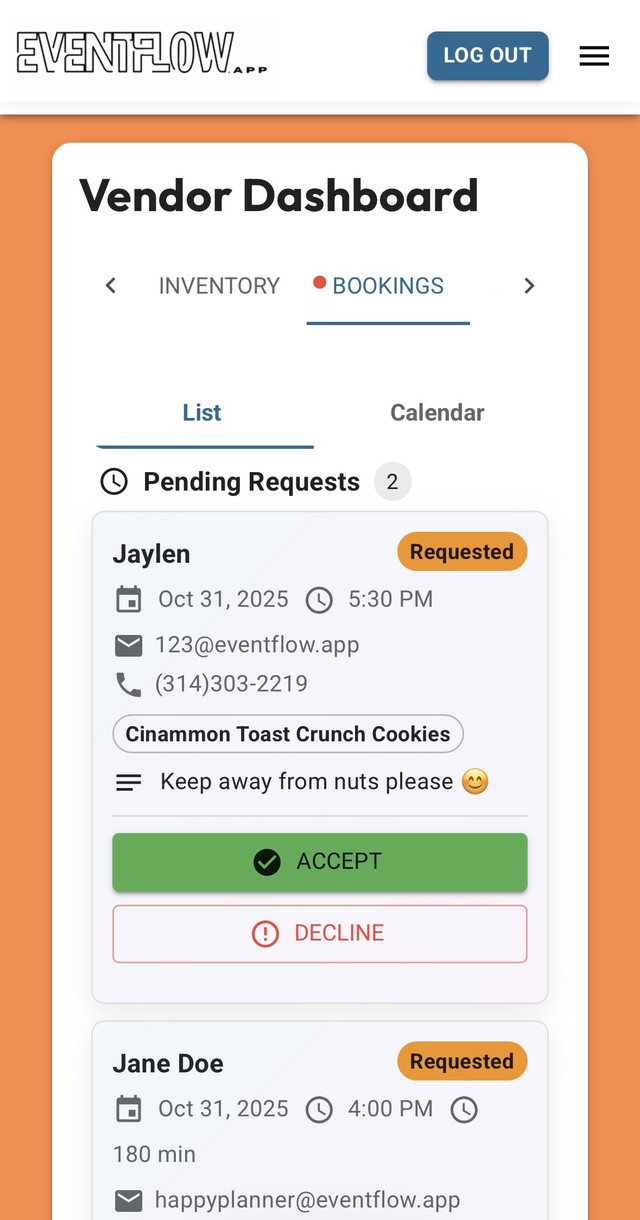
Publish your hours/slots to avoid conflicts. Choose Auto-Accept for instant booking, or review each request and Accept or Decline with a reason—so planners know how to adjust.
Premium perk: sell tickets at 3%
While your core is bookings, Premium vendors can also sell event tickets on eventflow.app at a reduced 3% platform fee (standard is 4%). Installment tickets add a separate 10% platform fee (no credit check).
Why eventflow.app instead of stitching tools?
Eventbrite is great for ticketing. Acuity shines for scheduling. eventflow.app unifies planning, booking, and the day-of experience.
eventflow.app
Create & host events
Vendor profiles + instant requests
Limited
Live availability (vendor-side)
Limited*
Accept / decline with reason
Limited**
Varies
Auto-accept for instant confirms
For some flows
Installment tickets (4% platform fee)
Via partners
Guest check-in & media in one dashboard
“I’m running late” with ETA (vendor)
Custom branding (colors/theme)
Limited (themes)
Limited
Guest management (RSVP, check-in, messages)
Limited*
Welcome messages (planners & vendors)
Limited (order emails)
Limited (notifications)
Custom images & videos on pages
Limited
Event search / discovery
Watch and learn in minutes
Short walkthroughs to get you moving fast. These come straight from our YouTube channel.
Create an Event in 60 Seconds
How Vendor Booking Works
Guest List & Check-In Demo
Request a Booking with a Vendor
Common questions
You can plan events and explore vendors for free. Premium options unlock more media, advanced tools, boosted placement for vendors, and quality-of-life features like “I’m running late” status with ETA.
Vendors list availability; planners request a slot. If auto-accept is on, confirmations happen instantly. Otherwise vendors accept—or decline with a short reason—so planners can adjust times or details.
Installments are managed by eventflow.app (no credit check) and include a 10% platform fee. They do not guarantee full up-front payout to the host. Guests can also choose a standard one-time Stripe payment at checkout.
Want to learn more? Check out our FAQ
Be the reason your event runs itself.
Planners: launch your page and add vendors when you’re ready. Vendors: set your availability and start accepting bookings today.
Early access perks are limited—claim yours while slots last.